

Exchange Server
The Exchange Server is a high-performance backend system optimized for cryptocurrency trading. It supports up to 10,000 trades per second and provides real-time data notifications through WebSocket.
Architecture
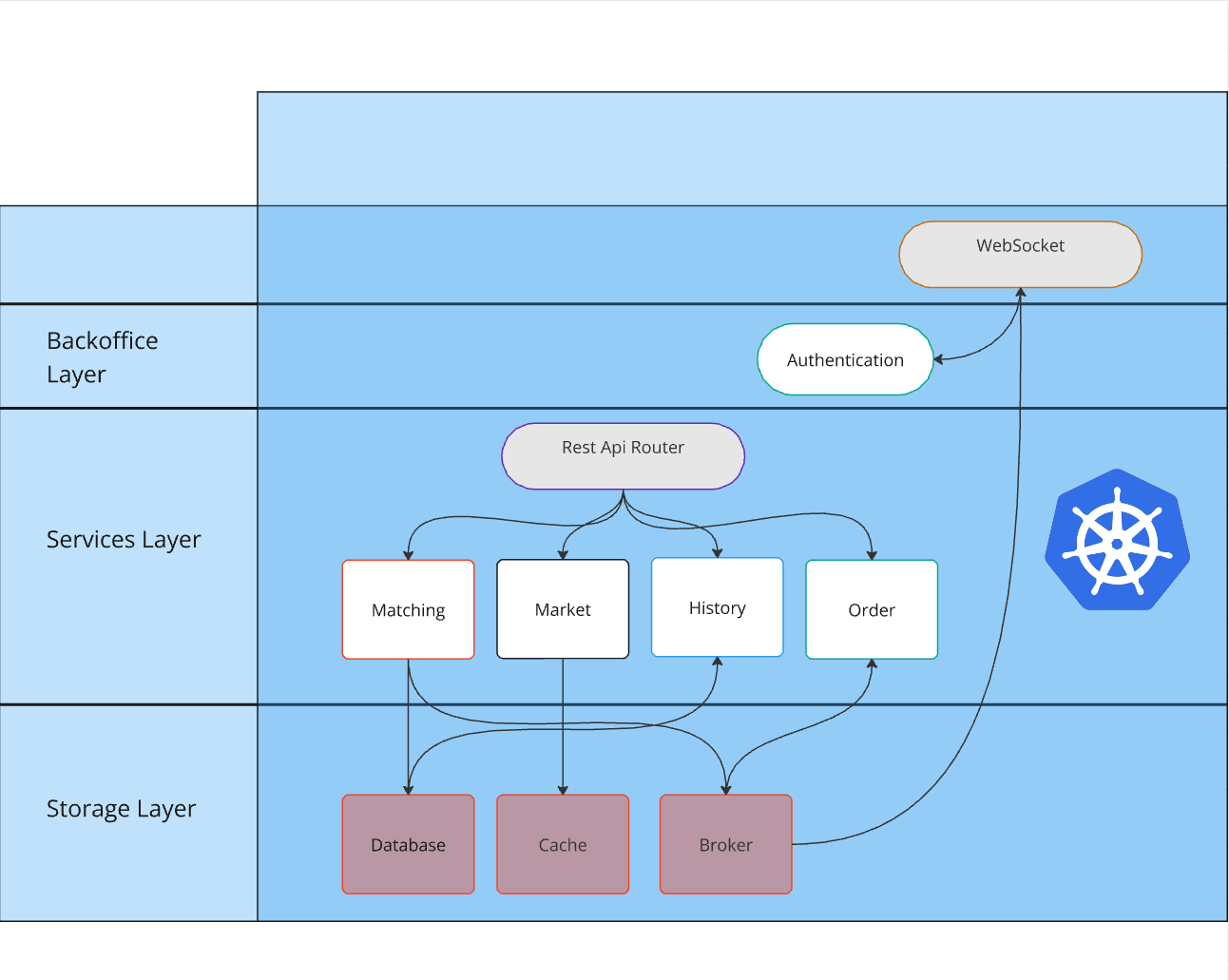
The Matching Services is identified as “Service layer” in the diagram above.
Code Structure
Required Components
- Database Service: Stores operational logs, user balance history, order history, and trade history.
- Cache Service: Stores market data and supports high-performance access to frequently requested information.
- Messaging Queue: Acts as the messaging queue for asynchronous communication.
Core Libraries
- Network Library: A high-efficiency networking library capable of handling 1M TCP connections. It includes TCP/UDP/UNIX SOCKET server and client implementations, along with support utilities such as timers, state machines, and thread pools.
- Utility Library: Provides basic utilities including logging, configuration parsing, data structures, and implementations for HTTP, WebSocket, and RPC servers.
Modules
- Execution Engine: The core system responsible for recording user balances and executing orders in-memory. It logs all operations in the database, replays them on startup, stores user history, and streams balance, order, and trade data to the messaging queue.
- Order Processing Service: TBD.
- Market Data Aggregator: Processes messages from the messaging queue to generate market data.
- Historical Data Reader: Reads historical data from the database for analytical purposes.
- API Gateway: Offers a simplified HTTP interface for higher-level system interactions.
- Real-Time Notification Service: Manages user and market data queries and real-time push notifications. Requires Nginx for WSS handling.
- Critical Logging Service: Logs critical errors to the cache service for alert notifications.
Deployment and Installation
TBD
Compilation
TBD
Exchange Server API
Request Format
Request
method: Method name, Stringparams: Parameters, Arrayid: Request ID, Integer
Response
result: JSON object,nullif failederror: JSON object,nullif successfulcode: Error codemessage: Error message
id: Request ID, Integer
General Error Codes
| Code | Description |
|---|---|
| 1 | Invalid argument |
| 2 | Internal error |
| 3 | Service unavailable |
| 4 | Method not found |
| 5 | Service timeout |
Market API
Add New Market
Method: market.add
URL:
http://example.com/
Parameters
The market.add method requires the following parameters:
| Parameter | Type | Description |
|---|---|---|
name |
String | The name of the market (e.g., “BTC_USDT”). |
stock |
String | The name of the stock asset to be traded (e.g., “BTC”). |
money |
String | The name of the money asset used for trading (e.g., “USDT”). |
is_listed |
Integer | Indicates if the market is listed (0 = not listed, 1 = listed). |
min_amount |
String | The minimum amount for trading in this market (e.g., “0.01”). |
Example Request with Python:
import requests

url = "http://example.com/"
payload = {
    "method": "market.add",
    "params": {
        "name": "BTC_USDT",        # Market name
        "stock": "BTC",            # Stock asset name
        "money": "USDT",           # Money asset name
        "is_listed": 1,            # Listed flag
        "min_amount": "0.01"       # Minimum amount for trading
    },
    "id": 3
}
headers = {"Content-Type": "application/json"}
response = requests.post(url, json=payload, headers=headers)
print(response.json())
Example Request with curl:
curl -X POST http://example.com/ \
-H "Content-Type: application/json" \
-d '{"method": "market.add","params": {"name": "BTC_USDT", "stock": "BTC", "money": "USDT", "is_listed": 1,"min_amount": "0.01"},"id": 3}'
Response Type:
json
Example Response:
The response confirms that the market was successfully added with all the provided details.
{
    "error": null,
    "result": [
        {
            "id": 1,
            "name": "BTC_USDT",
            "stock": "BTC",
            "money": "USDT",
            "stock_prec": 8,
            "money_prec": 8,
            "min_amount": "0.01",
            "is_listed": 1,
            "hide_percent": 1
        }
    ],
    "id": 3
}
Response Fields:
| Field | Type | Description |
|---|---|---|
id |
Integer | The unique ID of the market. |
name |
String | The name of the market. |
stock |
String | The stock asset in the market. |
money |
String | The money asset in the market. |
stock_prec |
Integer | The precision of the stock asset (e.g., 8 decimals). |
money_prec |
Integer | The precision of the money asset (e.g., 8 decimals). |
min_amount |
String | The minimum amount for trading in this market. |
is_listed |
Integer | Indicates if the market is listed (0 = not listed, 1 = listed). |
hide_percent |
Integer | Percentage visibility control (e.g., 1). |
Update Market
Method: market.update
URL:
http://example.com/
Parameters
The market.update method requires the following parameters:
| Parameter | Type | Description |
|---|---|---|
name |
String | The name of the market to be updated (e.g., “BTC_USDT”). |
is_listed |
Integer | Indicates if the market is listed (0 = not listed, 1 = listed) (optional). |
stock_prec |
Integer | The precision of the stock asset (optional, e.g., 8 decimals for BTC). |
money_prec |
Integer | The precision of the money asset (optional, e.g., 8 decimals for USDT). |
min_amount |
String | The minimum amount for trading in this market (optional, e.g., “0.01”). |
type |
Integer | The type of the market (optional). |
mp_type |
Integer | The type of price multiplier (optional). |
hide_percent |
Integer | The percentage of visibility (optional, e.g., 1). |
Example Request with Python:
import requests

url = "http://example.com/"
payload = {
    "method": "market.update",
    "params": {
        "name": "BTC_USDT",        # Market name
        "is_listed": 1,            # Listed flag (optional)
        "stock_prec": 8,           # Stock precision (optional)
        "money_prec": 8,           # Money precision (optional)
        "min_amount": "0.01",      # Minimum amount (optional)
        "type": 1,                 # Market type (optional)
        "mp_type": 2,              # Price multiplier type (optional)
        "hide_percent": 1          # Visibility percentage (optional)
    },
    "id": 4
}
headers = {"Content-Type": "application/json"}
response = requests.post(url, json=payload, headers=headers)
print(response.json())
Example Request with curl:
curl -X POST http://example.com/ \
-H "Content-Type: application/json" \
-d '{"method": "market.update","params": {"name": "BTC_USDT", "is_listed": 1, "stock_prec": 8, "money_prec": 8, "min_amount": "0.01", "type": 1, "mp_type": 2, "hide_percent": 1},"id": 4}'
Response Type:
json
Example Response:
The response confirms that the market was successfully updated with all the provided details.
{
    "error": null,
    "result": [
        {
            "id": 1,
            "name": "BTC_USDT",
            "stock": "BTC",
            "money": "USDT",
            "stock_prec": 8,
            "money_prec": 8,
            "min_amount": "0.01",
            "is_listed": 1,
            "hide_percent": 1
        }
    ],
    "id": 4
}
Response Fields:
| Field | Type | Description |
|---|---|---|
id |
Integer | The unique ID of the market. |
name |
String | The name of the market. |
stock |
String | The stock asset in the market. |
money |
String | The money asset in the market. |
stock_prec |
Integer | The precision of the stock asset (e.g., 8 decimals). |
money_prec |
Integer | The precision of the money asset (e.g., 8 decimals). |
min_amount |
String | The minimum amount for trading in this market. |
is_listed |
Integer | Indicates if the market is listed (0 = not listed, 1 = listed). |
hide_percent |
Integer | Percentage visibility control (e.g., 1). |
Market Data
import requests

url = "http://example.com/"
payload = {
    "method": "market.last",
    "params": ["BTC_USDT"],
    "id": 1
}
headers = {"Content-Type": "application/json"}
response = requests.post(url, json=payload, headers=headers)
print(response.json())
curl -X POST http://example.com/ \
-H "Content-Type: application/json" \
-d '{"method": "market.last", "params": ["BTC_USDT"], "id": 1}'
The above command returns JSON structured like this:
{
    "error": null,
    "result": "66858.22000000",
    "id": 1
}
Method: market.last
Parameters
market: Market name, String
Example Request with curl , python:
Response Type:
json
Executed History
curl -X POST http://example.com/ \
-H "Content-Type: application/json" \
-d '{"method": "market.deals", "params": ["BTC_USDT", 100, 0], "id": 1}'
import requests

url = "http://example.com/"
payload = {
    "method": "market.deals",
    "params": ["BTC_USDT", 100, 0],
    "id": 1
}
headers = {"Content-Type": "application/json"}
response = requests.post(url, json=payload, headers=headers)
print(response.json())
The above command returns JSON structured like this:
{
    "error": null,
    "result": [
        {
            "id": 1156,
            "time": 1729176270.0424521,
            "price": "66896",
            "amount": "0.00517",
            "type": "sell"
        },
        {
            "id": 1155,
            "time": 1729176269.7379661,
            "price": "66896",
            "amount": "0.00149",
            "type": "sell"
        },
        ...
    ],
    "id": 1
}
Method: market.deals
Parameters
market: Market name, Stringlimit: Number of records to retrieve, Integer (up to 10,000)last_id: ID of the last trade for pagination, Integer (optional)
Example Request with curl , python:
Response Type:
json
User Executed History
curl -X POST http://example.com/ \
-H "Content-Type: application/json" \
-d '{"method": "market.user_deals", "params": [1, "BTC_USDT", 0, 100], "id": 1}'
import requests

url = "http://example.com/"
payload = {
    "method": "market.user_deals",
    "params": [1, "BTC_USDT", 0, 100],
    "id": 1
}
headers = {"Content-Type": "application/json"}
response = requests.post(url, json=payload, headers=headers)
print(response.json())
The above command returns JSON structured like this:
{
  "error": null,
  "result": {
    "offset": 0,
    "limit": 100,
    "records": [
      {
        "id": 5,
        "time": 1492697636.238869,
        "user": 1,
        "side": 1,
        "role": 2,
        "amount": "0.1000",
        "price": "7000.00",
        "deal": "0.1000",
        "fee": "0.0002"
      }
    ]
  },
  "id": 1
}
Method: market.user_deals
Parameters
user_id: User ID, Integermarket: Market name, Stringoffset: Offset position for pagination, Integerlimit: Number of records to retrieve, Integer
Example Request with curl , python:
Response Type:
json
KLine Data
curl -X POST http://example.com/ \
-H "Content-Type: application/json" \
-d '{"method": "market.kline", "params": ["BTC_USDT", 1492358400, 1492697636, 60], "id": 1}'
import requests

url = "http://example.com/"
payload = {
    "method": "market.kline",
    "params": ["BTC_USDT", 1492358400, 1492697636, 60],
    "id": 1
}
headers = {"Content-Type": "application/json"}
response = requests.post(url, json=payload, headers=headers)
print(response.json())
The above command returns JSON structured like this:
{
  "error": null,
  "result": {
    "offset": 0,
    "limit": 100,
    "total": 0,
    "records": [[1492358400, "7000.00", "8000.00", "8100.00", "6800.00", "1000.00", "123456.78", "BTC_USDT"]]
  },
  "id": 1
}
Method: market.kline
Parameters
market: Market name, Stringstart: Start timestamp, Integerend: End timestamp, Integerinterval: Time interval between candles, Integer
Example Request with curl , python:
Response Type:
json
Market Status
curl -X POST http://example.com/ \
-H "Content-Type: application/json" \
-d '{"method": "market.status", "params": ["BTC_USDT", 86400], "id": 1}'
import requests

url = "http://example.com/"
payload = {
    "method": "market.status",
    "params": ["BTC_USDT", 86400],
    "id": 1
}
headers = {"Content-Type": "application/json"}
response = requests.post(url, json=payload, headers=headers)
print(response.json())
The above command returns JSON structured like this:
{
    "error": null,
    "result": {
        "period": 86400,
        "last": "67072.02",
        "open": "66840",
        "close": "67072.02",
        "high": "67093.99",
        "low": "66723.99",
        "volume": "44.25752",
        "deal": "2957454.346129"
    },
    "id": 1
}
Method: market.status
Parameters
market: Market name, Stringperiod: Time period in seconds (e.g., 86400 for the last 24 hours), Integer
Example Request with curl , python:
Response Type:
json
Market Status Today
curl -X POST http://example.com/ \
-H "Content-Type: application/json" \
-d '{"method": "market.status_today", "params": ["BTC_USDT"], "id": 1}'
import requests

url = "http://example.com/"
payload = {
    "method": "market.status_today",
    "params": ["BTC_USDT"],
    "id": 1
}
headers = {"Content-Type": "application/json"}
response = requests.post(url, json=payload, headers=headers)
print(response.json())
The above command returns JSON structured like this:
{
    "error": null,
    "result": {
        "open": "66840",
        "last": "67082.74",
        "high": "67093.99",
        "low": "66723.99",
        "volume": "45.01224",
        "deal": "3008080.3095034"
    },
    "id": 1
}
Method: market.status_today
Parameters
market: Market name, String
Example Request with curl , python:
Response Type:
json
Market List
curl -X POST http://example.com/ \
-H "Content-Type: application/json" \
-d '{"method": "market.list", "params": [], "id": 1}'
import requests

url = "http://example.com/"
payload = {
    "method": "market.list",
    "params": [],
    "id": 1
}
headers = {"Content-Type": "application/json"}
response = requests.post(url, json=payload, headers=headers)
print(response.json())
The above command returns JSON structured like this:
{
    "error": null,
    "result": [
        {
            "name": "BTC_USDT",
            "stock": "BTC",
            "money": "USDT",
            "fee_prec": 4,
            "stock_prec": 8,
            "money_prec": 8,
            "min_amount": "1e-8"
        }
    ],
    "id": 1
}
Method: market.list
Parameters
- None
Example Request with curl , python:
Response Type:
json
Market Summary
curl -X POST http://example.com/ \
-H "Content-Type: application/json" \
-d '{"method": "market.summary", "params": [], "id": 1}'
import requests

url = "http://example.com/"
payload = {
    "method": "market.summary",
    "params": [],
    "id": 1
}
headers = {"Content-Type": "application/json"}
response = requests.post(url, json=payload, headers=headers)
print(response.json())
The above command returns JSON structured like this:
{
    "error": null,
    "result": [
        {
            "name": "BTC_USDT",
            "ask_count": 0,
            "ask_amount": "0",
            "bid_count": 1,
            "bid_amount": "1e-8"
        }
    ],
    "id": 1
}
Method: market.summary
Parameters
markets: List of market names, returns overall market information if null.
Example Request with curl , python:
Response Type:
json
Asset API
Add New Asset
Method: asset.add
URL:
http://example.com/
Parameters
The asset.add method requires the following parameters:
| Parameter | Type | Description |
|---|---|---|
name |
String | The name of the asset (e.g., “BTC”). |
is_listed |
Integer | Indicates if the asset is listed (0 = no, 1 = yes). |
prec_save |
Integer | The precision for saving the asset (e.g., 20). |
prec_show |
Integer | The precision for displaying the asset (e.g., 8). |
type |
Integer | The type of the asset (e.g., 1 for normal assets). |
Example Request with Python:
import requests

url = "http://example.com/"
payload = {
    "method": "asset.add",
    "params": {
        "name": "BTC",
        "is_listed": 1,
        "prec_save": 20,
        "prec_show": 8,
        "type": 1
    },
    "id": 1
}
headers = {"Content-Type": "application/json"}
response = requests.post(url, json=payload, headers=headers)
print(response.json())
Example Request with curl:
curl -X POST http://example.com/ \
-H "Content-Type: application/json" \
-d '{"method": "asset.add", "params":{"name": "BTC", "is_listed": 1, "prec_save": 20, "prec_show": 8,  "type": 1 }, "id": 1}'
Response Type:
json
The response confirms that the asset was successfully added, with the assigned ID and specified parameters.
{
    "error": null,
    "result": [
        {
            "id": 5,
            "name": "BTC",
            "prec_save": 20,
            "prec_show": 8,
            "type": 1,
            "is_listed": 1
        }
    ],
    "id": 1
}
Update Asset
Method: asset.update
URL:
http://example.com/
Parameters
The asset.update method requires the following parameters:
| Parameter | Type | Description |
|---|---|---|
name |
String | The current name of the asset to be updated (e.g., “TUSD”). |
new_name |
String | The new name for the asset (optional, e.g., “USDT”). |
is_listed |
Integer | Updated listing status of the asset (0 = not listed, 1 = listed). |
Example Request with Python:
import requests

url = "http://example.com/"
payload = {
    "method": "asset.update",
    "params": {
        "name": "TUSD",        # Current asset name
        "new_name": "USDT",    # Optional new name for the asset
        "is_listed": 1         # Updated listing status
    },
    "id": 2
}
headers = {"Content-Type": "application/json"}
response = requests.post(url, json=payload, headers=headers)
print(response.json())
Example Request with curl:
curl -X POST http://example.com/ \
-H "Content-Type: application/json" \
-d '{"method": "asset.update","params": {"name": "TUSD","new_name": "USDT",  "is_listed": 1},"id": 2}'
Response Type:
json
Example Response:
The response confirms that the asset was successfully updated, with the updated details such as name, precision values, type, and listing status.
{
    "error": null,
    "result": [
        {
            "id": 5,
            "name": "BTC",
            "prec_save": 20,
            "prec_show": 8,
            "type": 1,
            "is_listed": 1
        }
    ],
    "id": 2
}
Asset Inquiry
import requests

url = "http://example.com/"
payload = {
    "method": "balance.query",
    "params": [1, "BTC"],
    "id": 1
}
headers = {"Content-Type": "application/json"}
response = requests.post(url, json=payload, headers=headers)
print(response.json())
curl -X POST http://example.com/ \
-H "Content-Type: application/json" \
-d '{"method": "balance.query", "params": [1, "BTC"], "id": 1}'
The above command returns JSON structured like this:
{
  "error": null,
  "result": {
    "BTC": {
      "available": "1.10000000",
      "freeze": "9.90000000"
    }
  },
  "id": 1
}
Method: balance.query
Parameters
user_id: User ID, Integerassets: List of asset names (optional), String. If omitted, returns overall assets.
Example Request with curl, python:
Response Type:
json
Asset Update
import requests

url = "http://example.com/"
payload = {
    "method": "balance.update",
    "params": [1, "BTC", "deposit", 100, "-1.2345", {}],
    "id": 1
}
headers = {"Content-Type": "application/json"}
response = requests.post(url, json=payload, headers=headers)
print(response.json())
curl -X POST http://example.com/ \
-H "Content-Type: application/json" \
-d '{"method": "balance.update", "params": [1, "BTC", "deposit", 100, "-1.2345", {}], "id": 1}'
The above command returns JSON structured like this:
{
  "error": null,
  "result": "success",
  "id": 1
}
Method: balance.update
Parameters
user_id: User ID, Integerasset: Asset name, Stringbusiness: Business type, Stringbusiness_id: Business ID, Integer (ensures idempotency)change: Balance change, String (negative for deductions)detail: Additional details, JSON object
Example Request with curl, python:
Response Type:
json
Asset List
import requests

url = "http://example.com/"
payload = {
    "method": "asset.list",
    "id": 1
}
headers = {"Content-Type": "application/json"}
response = requests.post(url, json=payload, headers=headers)
print(response.json())
curl -X POST http://example.com/ \
-H "Content-Type: application/json" \
-d '{"method": "asset.list", "params": [], "id": 1}'
The above command returns JSON structured like this:
{
    "error": null,
    "result": [
        {
            "id": 5,
            "name": "BTC",
            "prec": 8,
            "prec_save": 20,
            "is_listed": 1,
            "type": 1
        },
        {
            "id": 3,
            "name": "ETH",
            "prec": 8,
            "prec_save": 20,
            "is_listed": 1,
            "type": 1
        },
        {
            "id": 6,
            "name": "USDT",
            "prec": 8,
            "prec_save": 20,
            "is_listed": 1,
            "type": 1
        }
    ],
    "id": 1
}
Method: asset.list
Parameters
- None
Example Request with curl, python:
Response Type:
json
Asset Summary
import requests

url = "http://example.com/"
payload = {
    "method": "asset.summary",
    "params": [],
    "id": 1
}
headers = {"Content-Type": "application/json"}
response = requests.post(url, json=payload, headers=headers)
print(response.json())
curl -X POST http://example.com/ \
-H "Content-Type: application/json" \
-d '{"method": "asset.summary", "params": [], "id": 1}'
The above command returns JSON structured like this:
{
    "error": null,
    "result": [
        {
            "name": "ETH",
            "total_balance": "0",
            "available_count": 0,
            "available_balance": "0",
            "freeze_count": 0,
            "freeze_balance": "0"
        },
        {
            "name": "BTC",
            "total_balance": "0",
            "available_count": 0,
            "available_balance": "0",
            "freeze_count": 0,
            "freeze_balance": "0"
        },
        {
            "name": "USDT",
            "total_balance": "10100",
            "available_count": 1,
            "available_balance": "10099.99991992",
            "freeze_count": 1,
            "freeze_balance": "0.00008008"
        }
    ],
    "id": 1
}
Method: asset.summary
Parameters
assets: List of asset names, returns overall asset information if null.
Example Request with curl, python:
Response Type:
json
Matching API
Place Limit Order
import requests

url = "http://example.com/"
payload = {
    "method": "order.put_limit",
    "params": [1, "BTC_USDT", 1, "10", "8000", "0.002", "0.001", "web"],
    "id": 1
}
headers = {"Content-Type": "application/json"}
response = requests.post(url, json=payload, headers=headers)
print(response.json())
curl -X POST http://example.com/ \
-H "Content-Type: application/json" \
-d '{"method": "order.put_limit", "params": [1, "BTC_USDT", 1, "10", "8000", "0.002", "0.001", "web"], "id": 1}'
The above command returns JSON structured like this:
> The above command returns JSON structured like this:
```json
{
    "error": null,
    "result": {
        "id": 1,
        "market_id": 1,
        "market": "BTC_USDT",
        "source": "web",
        "type": 1,
        "side": 1,
        "user": 1,
        "ctime": 1729162600.930465,
        "mtime": 1729162600.930465,
        "fee_type": 0,
        "price": "8000",
        "amount": "10",
        "taker_fee": "0.002",
        "maker_fee": "0.001",
        "left": "10",
        "deal_stock": "0",
        "deal_money": "0",
        "deal_fee": "0",
        "defi_fee": "0",
        "defi_deal_fee": "0",
        "detail": null
    },
    "id": 1
}
Method: order.put_limit
Parameters
user_id: User ID, Integermarket: Market name, Stringside: 1 for sell, 2 for buy, Integeramount: Order quantity, Stringprice: Order price, Stringtaker_fee_rate: Taker fee, Stringmaker_fee_rate: Maker fee, Stringsource: Order source, String (up to 30 bytes)
Example Request with curl, python:
Response Type:
json
Place Market Order
import requests

url = "http://example.com/"
payload = {
    "method": "order.put_market",
    "params": [1, "BTC_USDT", 1, "10", "0.002", "web"],
    "id": 1
}
headers = {"Content-Type": "application/json"}
response = requests.post(url, json=payload, headers=headers)
print(response.json())
curl -X POST http://example.com/ \
-H "Content-Type: application/json" \
-d '{"method": "order.put_market", "params": [1, "BTC_USDT", 1, "10", "0.002", "web"], "id": 1}'
The above command returns JSON structured like this:
{
  "result": {
    "order_id": 200,
    "market": "BTC_USDT",
    "side": 1,
    "amount": "10.0000"
  },
  "id": 1
}
Method: order.put_market
Parameters
user_id: User ID, Integermarket: Market name, Stringside: 1 for sell, 2 for buy, Integeramount: Order quantity, Stringtaker_fee_rate: Taker fee, Stringsource: Order source, String (up to 30 bytes)
Example Request with curl, python:
Response Type:
json
Cancel Order
import requests

url = "http://example.com/"
payload = {
    "method": "order.cancel",
    "params": [1, "BTC_USDT", 100],
    "id": 1
}
headers = {"Content-Type": "application/json"}
response = requests.post(url, json=payload, headers=headers)
print(response.json())
curl -X POST http://example.com/ \
-H "Content-Type: application/json" \
-d '{"method": "order.cancel", "params": [1, "BTC_USDT", 100], "id": 1}'
The above command returns JSON structured like this:
{
  "result": {
    "order_id": 100,
    "status": "cancelled"
  },
  "id": 1
}
Method: order.cancel
Parameters
user_id: User ID, Integermarket: Market name, Stringorder_id: Order ID, Integer
Example Request with curl, python:
Response Type:
json
Order Depth
import requests

url = "http://example.com/"
payload = {
    "method": "order.depth",
    "params": ["BTC_USDT", 10, "1"],
    "id": 1
}
headers = {"Content-Type": "application/json"}
response = requests.post(url, json=payload, headers=headers)
print(response.json())
curl -X POST http://example.com/ \
-H "Content-Type: application/json" \
-d '{"method": "order.depth", "params": ["BTC_USDT", 10, "1"], "id": 1}'
The above command returns JSON structured like this:
{
  "error": null,
  "result": {
    "asks": [
      ["8000.00", "9.6250"]
    ],
    "bids": [
      ["7000.00", "0.1000"]
    ]
  },
  "id": 1
}
Method: order.depth
Parameters
market: Market name, Stringlimit: Number of orders to return, Integerinterval: Price interval, String (e.g., “1” for 1 unit interval, “0” for no interval)
Example Request with curl, python:
Response Type:
json
Pending Orders
import requests

url = "http://example.com/"
payload = {
    "method": "order.pending",
    "params": [1, "BTC_USDT", 0, 100],
    "id": 1
}
headers = {"Content-Type": "application/json"}
response = requests.post(url, json=payload, headers=headers)
print(response.json())
curl -X POST http://example.com/ \
-H "Content-Type: application/json" \
-d '{"method": "order.pending", "params": [1, "BTC_USDT", 0, 100], "id": 1}'
The above command returns JSON structured like this:
{
    "error": null,
    "result": {
        "offset": 0,
        "limit": 100,
        "total": 1,
        "records": [
            {
                "id": 1,
                "market": "BTC_USDT",
                "source": "web",
                "type": 1,
                "side": 2,
                "user": 1,
                "ctime": 1729162600.930465,
                "mtime": 1729162600.930465,
                "fee_type": 0,
                "price": "8000",
                "amount": "1e-8",
                "taker_fee": "0.002",
                "maker_fee": "0.001",
                "left": "1e-8",
                "deal_stock": "0e-64",
                "deal_money": "0e-64",
                "deal_fee": "0e-64",
                "defi_fee": "0e-64",
                "defi_deal_fee": "0e-64",
                "detail": null
            }
        ]
    },
    "id": 1}
Method: order.pending
Parameters
user_id: User ID, Integermarket: Market name, Stringoffset: Offset position, Integerlimit: Number of orders to return, Integer
Example Request with curl, python:
Response Type:
json
Errors
General Error Codes
| Code | Description |
|---|---|
| 1 | Invalid argument |
| 2 | Internal error |
| 3 | Service unavailable |
| 4 | Method not found |
| 5 | Service timeout |
weight: 7 title: “Exchange Server Matching API” language_tabs:
- shell: Shell
- python: Python
- json: JSON toc_footers:
- Learn about JSON-RPC
- Project Repository search: true
WebSocket Server API Documentation
The API is based on JSON-RPC over WebSocket protocol. Repeated subscriptions for the same data type will cancel previous subscriptions.
Request and Response Structures
Request:
method: API method name, Stringparams: Method parameters, Arrayid: Unique request ID, Integer
Response:
result: JSON object,nullif failederror: JSON object,nullif successful, non-null if failedcode: Error codemessage: Error message
id: Request ID, Integer
Notification:
method: API method name, Stringparams: Method parameters, Arrayid:null
Error Codes
1: Invalid argument2: Internal error3: Service unavailable4: Method not found5: Service timeout6: Authentication required
Authorization API
ID Verification (Web)
- Method:
server.auth - Params:
token: String, the authentication tokensource: String, source type, e.g.,"web"
Example WebSocket Request:
{
    "method": "server.auth",
    "params": ["your_token", "web"],
    "id": 1020
}
Response:
{
    "error": null,
    "result": "authenticated",
    "id": 1020
}
System API
PING
- Method:
server.ping - Params: None
- Result:
"pong"
Example WebSocket Request:
{
    "method": "server.ping",
    "params": [],
    "id": 1000
}
Response:
{
    "error": null,
    "result": "pong",
    "id": 1000
}
System Time
- Method:
server.time - Params: None
- Result: Current server timestamp, Integer
Example WebSocket Request:
{
    "method": "server.time",
    "params": [],
    "id": 1001
}
Response:
{
    "error": null,
    "result": 1694000000,
    "id": 1001
}
Market API
Market Inquiry
- Method:
kline.query - Params:
market: Market namestart: Start time (Unix timestamp), Integerend: End time (Unix timestamp), Integerinterval: Interval, Integer
Example WebSocket Request:
{
    "method": "kline.query",
    "params": ["BTC_USDT", 1492358400, 1492444800, 60],
    "id": 1004
}
Response:
{
    "error": null,
    "result": [
        [1492358400, "7000.00", "8000.0", "8100.00", "6800.00", "1000.00", "123456.00", "BTC_USDT"]
    ],
    "id": 1004
}
Market Subscription
- Method:
kline.subscribe - Params:
market: Market nameinterval: Interval, Integer
Example WebSocket Request:
{
    "method": "kline.subscribe",
    "params": ["BTC_USDT", 60],
    "id": 1005
}
Response:
{
    "error": null,
    "result": "subscribed",
    "id": 1005
}
Cancel Subscription
- Method:
kline.unsubscribe - Params: None
Example WebSocket Request:
{
    "method": "kline.unsubscribe",
    "params": [],
    "id": 1006
}
Response:
{
    "error": null,
    "result": "unsubscribed",
    "id": 1006
}
Price API
Acquire Latest Price
- Method:
price.query - Params:
market: String, market name
Example WebSocket Request:
{
    "method": "price.query",
    "params": ["BTC_USDT"],
    "id": 1007
}
Response:
{
    "error": null,
    "result": "7000.00",
    "id": 1007
}
Latest Price Subscription
- Method:
price.subscribe - Params: List of market names
Example WebSocket Request:
{
    "method": "price.subscribe",
    "params": ["BTC_USDT", "ETH_USDT"],
    "id": 1008
}
Response:
{
    "error": null,
    "result": "subscribed",
    "id": 1008
}
Market Status API
Acquire Market Status
- Method:
state.query - Params:
market: Market nameperiod: Cycle period, Integer (e.g., 86400 for last 24 hours)
Example WebSocket Request:
{
    "method": "state.query",
    "params": ["BTC_USDT", 86400],
    "id": 1009
}
Response:
{
  "error": null,
  "result": {
    "period": 86400,
    "last": "65000",
    "open": "0",
    "close": "0",
    "high": "0",
    "low": "0",
    "volume": "0",
    "deal": "0"
  },
  "id": 1009
}
Deal API
Acquire Latest Executed List
- Method:
deals.query - Params:
market: Market namelimit: Amount limit, Integerlast_id: Largest ID of last returned result
Example WebSocket Request:
{
    "method": "deals.query",
    "params": ["BTC_USDT", 50, 0],
    "id": 1010
}
Response:
{
    "error": null,
    "result": [
        {
            "id": 1,
            "time": 1622540000,
            "price": "7000.00",
            "amount": "0.5",
            "type": "buy"
        },
        ...
    ],
    "id": 1010
}
Latest Order List Subscription
- Method:
deals.subscribe - Params: List of market names
Example WebSocket Request:
{
    "method": "deals.subscribe",
    "params": ["BTC_USDT"],
    "id": 1011
}
Response:
{
    "error": null,
    "result": "subscribed",
    "id": 1011
}
Cancel Subscription
- Method:
deals.unsubscribe - Params: None
Example WebSocket Request:
{
    "method": "deals.unsubscribe",
    "params": [],
    "id": 1012
}
Response:
{
    "error": null,
    "result": "unsubscribed",
    "id": 1012
}
Depth API
Acquire Depth
- Method:
depth.query - Params:
market: Market name, Stringlimit: Amount limit, Integerinterval: Interval, String (e.g., “1” for 1 unit interval, “0” for no interval)
Example WebSocket Request:
{
    "method": "depth.query",
    "params": ["BTC_USDT", 10, "1"],
    "id": 1013
}
Response:
{
    "error": null,
    "result": {
        "asks": [["8000.00", "9.6250"]],
        "bids": [["7000.00", "0.1000"]]
    },
    "id": 1013
}
Depth Subscription
- Method:
depth.subscribe - Params:
market: Market name, Stringlimit: Amount limit, Integerinterval: Interval, String
Example WebSocket Request:
{
    "method": "depth.subscribe",
    "params": ["BTC_USDT", 10, "1"],
    "id": 1014
}
Response:
{
    "error": null,
    "result":

 "subscribed",
    "id": 1014
}
Order API (Authentication Required)
Unexecuted Order Inquiry
- Method:
order.query - Params:
market: Market name, Stringoffset: Offset, Integerlimit: Limit, Integer
Example WebSocket Request:
{
    "method": "order.query",
    "params": ["BTC_USDT", 0, 10],
    "id": 1015
}
Response:
{
    "error": null,
    "result": [
        {"id": 1, "market": "BTC_USDT", "amount": "1.5", "price": "7000.00", "status": "open"},
        ...
    ],
    "id": 1015
}
Executed Order Inquiry
- Method:
order.history - Params:
market: Market name, Stringstart_time: Start time, Integerend_time: End time, Integeroffset: Offset, Integerlimit: Limit, Integerside: Side, Integer (1 for sell, 2 for buy)
Example WebSocket Request:
{
    "method": "order.history",
    "params": ["BTC_USDT", 1620000000, 1625000000, 0, 10, 1],
    "id": 1016
}
Response:
{
    "error": null,
    "result": [
        {"id": 2, "market": "BTC_USDT", "amount": "2.0", "price": "7100.00", "status": "filled"},
        ...
    ],
    "id": 1016
}
Asset API (Authentication Required)
Asset Inquiry
- Method:
asset.query - Params: List of asset names or
nullto query all
Example WebSocket Request:
{
    "method": "asset.query",
    "params": ["BTC", "ETH"],
    "id": 1017
}
Response:
{
    "error": null,
    "result": {
        "BTC": {"available": "1.5", "freeze": "0.5"},
        "ETH": {"available": "10.0", "freeze": "2.0"}
    },
    "id": 1017
}
Asset History
- Method:
asset.history - Params:
asset: Asset name, can benullbusiness: Business type, can benullstart_time: Start time, Integerend_time: End time, Integeroffset: Offset, Integerlimit: Amount limit, Integer
Example WebSocket Request:
{
    "method": "asset.history",
    "params": ["BTC", null, 1620000000, 1625000000, 0, 10],
    "id": 1018
}
Response:
{
    "error": null,
    "result": [
        {"asset": "BTC", "available": "1.5", "freeze": "0.5", "timestamp": 1622540000},
        ...
    ],
    "id": 1018
}